Passwords have one fatal design flaw: they travel. Because you have to send a password over the internet to log in, it can be intercepted, stolen in a server breach, or given away to a convincing fake website. The Anti-Phishing Working Group (APWG) recorded approximately 3.8 million phishing attacks globally in 2025. Over 90% of all cyberattacks begin with a phishing lure.
According to the FIDO Alliance and HID Global, 69% of consumers now have at least one passkey set up, up from just 39% two years ago. Furthermore, 87% of companies are now actively deploying passkeys.
What is FIDO Passkey?
A FIDO passkey is a highly secure digital credential that replaces traditional passwords with public-key cryptography. Governed by the FIDO (Fast IDentity Online) Alliance, "passkey" is simply the consumer-friendly brand name adopted by Apple, Google, and Microsoft to describe FIDO2 credentials.
At its simplest, a FIDO passkey is a digital key pair that replaces your password. Instead of typing a "shared secret" that both you and the website must memorize and store, a passkey splits the credential in two:
A private key which is stored securely on your device (like your phone or laptop).
A public key which is stored on the website or app's server.
When you want to log in, the website asks your device to prove it has the private key. You approve this request using your device's built-in biometrics (Face ID, Touch ID, or Windows Hello) or a local PIN. Your device mathematically proves your identity to the server without ever transmitting the private key over the internet.
How Passkeys Work
For IT administrators and engineers, the underlying FIDO2 standard relies on WebAuthn and CTAP - two distinct protocols. WebAuthn is the web standard that governs how browsers and web applications handle public key credentials for most identity and access management solutions.
Whereas, CTAP (Client to Authenticator Protocol) is the standard governing the actual communication between your browser/OS and the cryptographic hardware element (like an external security key or an internal secure enclave).
Here is the exact cryptographic sequence:
Registration:
The website sends a cryptographic challenge and its domain (the Relying Party ID, or RP ID). Your device generates a fresh keypair unique to that RP ID. The private key locks itself inside your device's Trusted Platform Module (TPM) or Secure Element (SE).
Domain Binding:
When you return to log in, the browser checks the active tab's origin against the registered domain. If an Adversary-in-the-Middle (AiTM) attacker lures you to a lookalike fake site, the browser detects the origin mismatch and refuses to pass the challenge to your device.
Authentication:
The hardware chip retrieves the correct private key, signs the challenge, and returns the signature to the browser. The website verifies the signature against the stored public key.
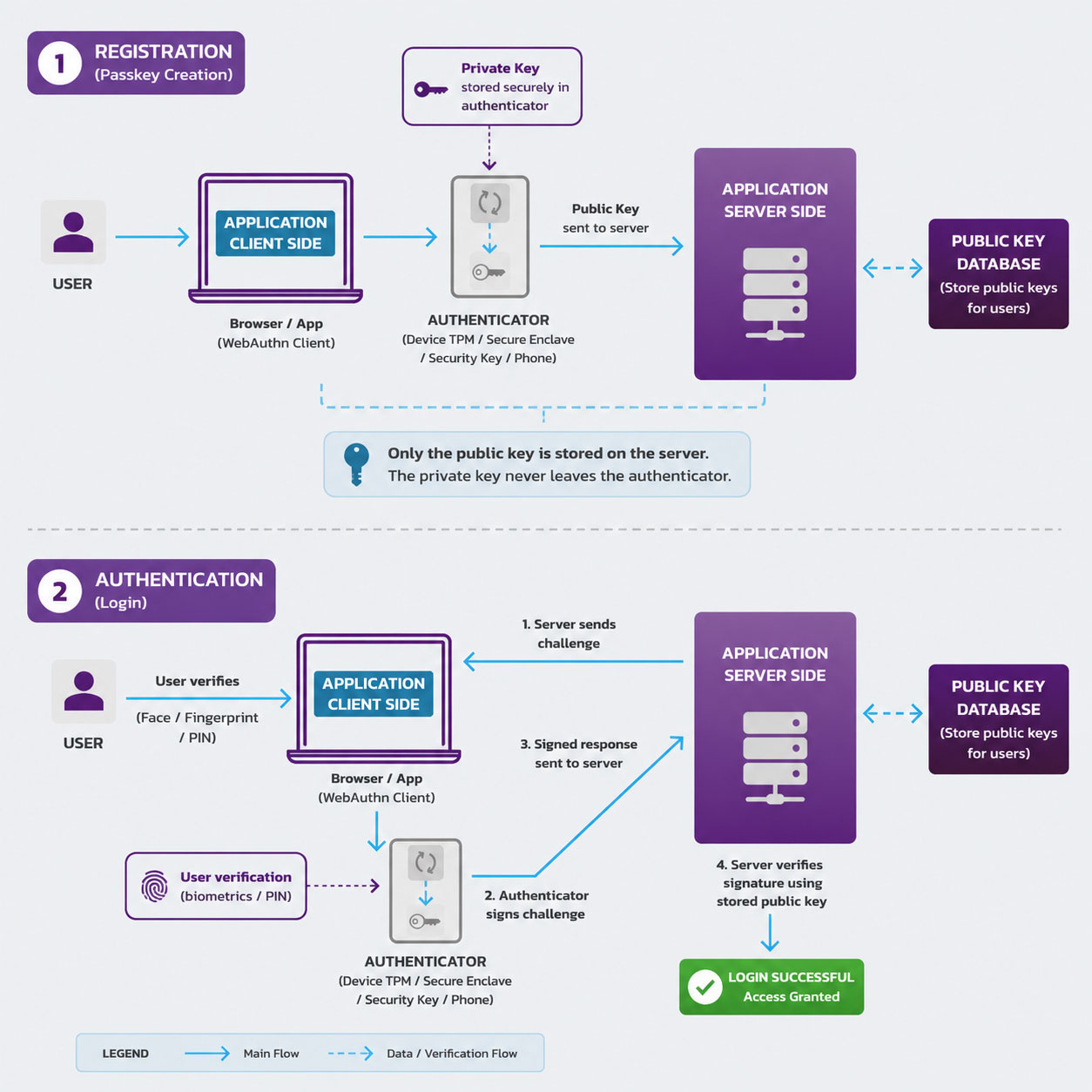
Because your biometric data (your face or fingerprint) is only used to unlock the device locally, it is never sent to the website, neutralizing the threat of biometric theft or AI deepfakes over the network.
FIDO Passkey vs Password
A password is a shared secret; if the server is hacked, the hacker steals your password. A passkey is an asymmetric keypair. If a server is hacked, the hacker only gets the public key, which is mathematically useless without the private key stored on your phone.
When you log into a service with a passkey, the interaction is nearly identical to unlocking your phone.
- User inputs their username or email into the app/website.
- Device prompts the user for local authentication (Face ID, Fingerprint, or PIN).
- Private Key is unlocked on the device and signs a secure cryptographic challenge.
- Website Server verifies the signature using its stored Public Key and grants access instantly.
Traditional MFA requires two steps: typing a password, then typing a 6-digit code sent via SMS or an authenticator app. A passkey inherently fulfills the definition of MFA in a single step. It requires "something you have" (the physical device holding the private key) and "something you are" (the biometric scan used to unlock it).
A passkey is the actual software credential. A security key is a piece of physical hardware. While you can sync passkeys across the cloud, you can also store a "device-bound passkey" permanently on a physical security key for maximum, enterprise-grade protection.
How to Create a FIDO Passkey
To create a passkey as an end-user:
- Navigate to the Security Settings or Account Settings of a supported website.
- Select Create a Passkey (or "Add a Security Key").
- Your operating system will prompt you to authenticate locally using your device's biometric authentication sensor or a device PIN.
- The keypair is generated instantly. Next time you log in, the site will simply ask for a quick biometric scan.
How Major Ecosystems Implement Passkeys
Apple allows users to generate and store passkeys securely within iCloud Keychain. This means a passkey created on an iPhone will automatically sync to your iPad and macOS Ventura+ Macbook using end-to-end encryption.
Google syncs passkeys across your Android devices and the Chrome browser. Google has been highly aggressive in passkey rollout, making them the default sign-in method for personal Google Accounts, which led to a massive 352% growth in passkey authentications across their ecosystem.
Microsoft integrates passkeys natively into Windows 10 and 11 via Windows Hello (facial recognition, fingerprint, or PIN). On the enterprise side, Microsoft is currently auto-enabling passkey profiles across Microsoft Entra ID tenants, initiating hybrid biometric IAM architectures.
Comments