Quick Summary
The deadline for transitioning from L0 to L1 certified biometric devices for Aadhaar authentication has been extended.The final date for L0 devices is now June 30, 2025. After this date, L0 devices will be deactivated for Aadhaar services, and their continued use may attract transaction fees. This biometric update in Aadhaar marks one of the most significant security transitions in India’s digital identity framework.
Key Takeaways
Mandatory Transition:
This upgrade is essential for all services using Aadhaar authentication, including banking (AEPS), telecom (eKYC), and government schemes.
Enhanced Security:
L1 devices encrypt biometric data within a secure, on-device chip, unlike L0 devices which rely on the host system.
New Deadline:
All entities must migrate to L1 devices by June 30, 2025.
What is an L1 Biometric Device?
Definition:An L1 Biometric Device is a certified, secure biometric scanner that performs both liveness detection and on-device encryption to ensure the authenticity and safety of biometric data. Unlike basic L0 devices that only capture raw fingerprints, facial images, or iris scans, an L1 device verifies that the input comes from a real, live person and not from a photo, video, or replica.
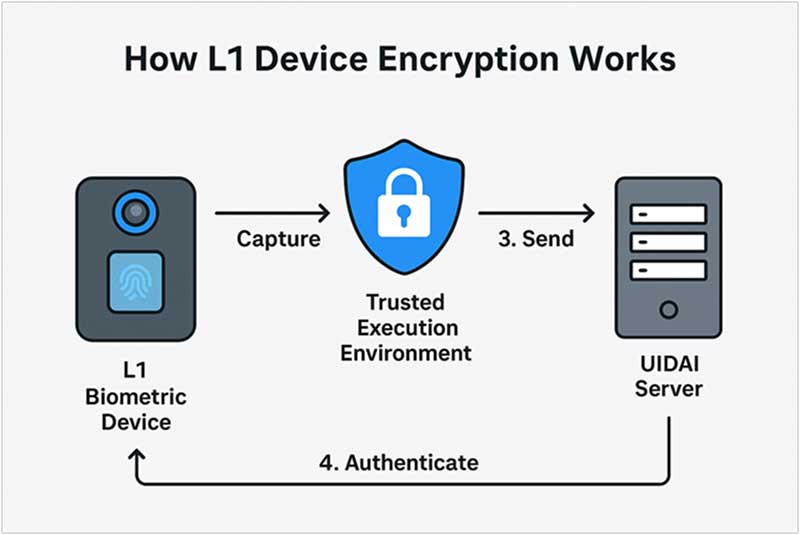
The L1 device encrypts data inside its Trusted Execution Environment (TEE) before anything leaves the hardware.
The letter “L” in L1stands for “Level” representing the degree of security and intelligence built into a biometric device, especially when it comes to anti-spoofing and data protection. Furthermore, L2 devices (Level 2) go even further by including presentation attack detection (PAD) and sometimes multi-modal verification, giving them the ability to detect more sophisticated spoofing methods and verify data authenticity before it’s shared with the central system.
Moreover, L1 devices are certified under UIDAI’s Registered Device (RD) Specification, which requires them to use a Trusted Execution Environment (TEE) for all biometric operations. This means the biometric data is encrypted at the moment it’s captured and securely transmitted without ever being exposed in plain form.
L0 vs. L1 Biometric Device
The main difference is that L0 biometric devices simply scan and send biometric data without checking if the person is real or if the input has been tampered with. They don’t have built-in intelligence to detect spoofing attempts like photos, videos, or masks. In contrast, modern L1 and L2 devices come with anti-spoofing layers such as liveness detection and presentation attack detection.
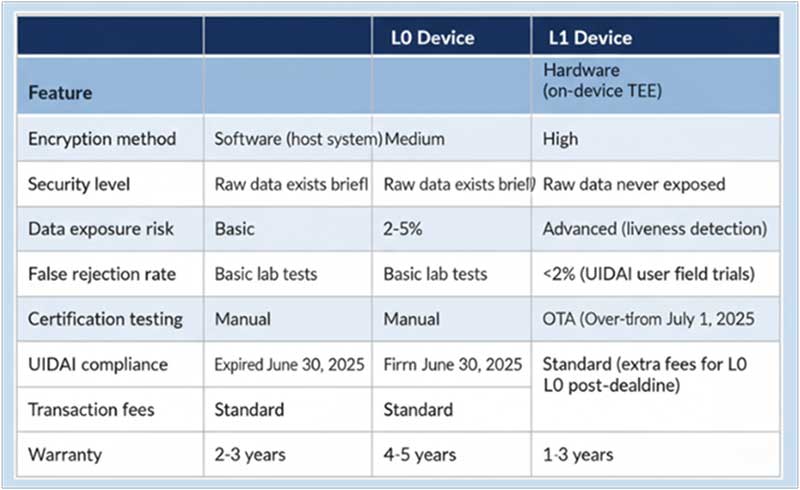
Note that the difference of having a TEE on-device chip is what makes the main difference.
Also Read - What is L1 Fingerprint Authentication?
Confirmed Aadhaar-Compliant (Registered Device)
MFS110
The Mantra MFS110 is one of India’s most widely adopted L1-certified fingerprint scanners, approved by UIDAI for Aadhaar-based authentication. Built with a Trusted Execution Environment (TEE) and on-device encryption, it ensures biometric data never leaves the device unprotected. Compact and affordable, it’s designed for large-scale government, banking, and telecom operations that rely on the Aadhaar ecosystem. Its compliance with STQC and UIDAI RD Service standards makes it one of the most trusted choices for agencies migrating from L0 to L1 devices before the June 2025 deadline.
MARC11
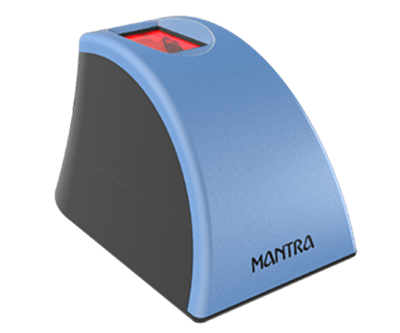
The Mantra MARC11 is an advanced L1 biometric fingerprint scanner engineered to meet UIDAI’s latest security and performance specifications. Featuring high-speed capture, AES-256 encryption, and robust spoof detection, MARC11 is purpose-built for Aadhaar eKYC and AEPS transactions. Its ergonomic design and USB connectivity make it ideal for front-line use in banking correspondents, telecom outlets, and citizen service centers. Like the MFS110, it is both STQC-tested and UIDAI-approved, ensuring reliability and data integrity in high-volume authentication environments.
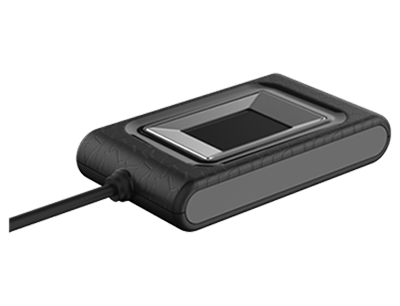
MIS100-V2
The MIS100-V2 is Mantra’s L1-certified iris scanner approved by UIDAI for Aadhaar authentication and eKYC operations. It captures high-resolution iris images quickly and accurately, even in varied lighting conditions, making it well-suited for rural and semi-urban enrolment centers. The device integrates on-device encryption, secure key storage, and liveness detection, ensuring compliance with the latest Aadhaar security framework. Trusted across government welfare programs and digital KYC implementations, MIS100-V2 stands out as one of the most reliable iris authentication solutions in India’s expanding digital identity ecosystem.
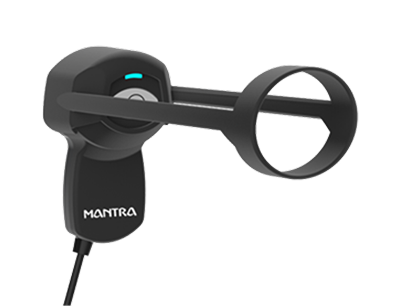
IMPORTANT: Always verify certification on the official UIDAI Registered Devices Portal before purchase. Model numbers and certification status change frequently. For confirmation, you can take a look at the list of biometric certified devices as per STQC.
Also Read - How Does an Optical Fingerprint Sensor Work?
Implementation Guide for Businesses
Migrating from L0 to L1 requires a clear plan.
Step :
Audit and Select
Inventory: Create a list of all current L0 devices and their deployment locations.
Assess Needs: Consider transaction volume and operating conditions. A high-traffic bank branch needs a more durable device than a small business with occasional eKYC needs.
Budget: Plan for procurement based on the updated, more affordable market prices.
Step :
Procure and Integrate
Verify Vendor: Purchase devices only from reputable, UIDAI-approved vendors.
Check UIDAI List: Cross-reference the model number on the official UIDAI portal before making a bulk purchase.
Update Software: Contact your Authentication User Agency (AUA) or KYC User Agency (KUA) to ensure their application software and drivers are updated to support L1 devices.
Step :
Train and Deploy
Staff Training: Educate staff on proper handling, cleaning, and basic troubleshooting for the new devices.
Firmware Management: Establish a process for regular Over-the-Air (OTA) firmware updates to maintain security and performance.
Troubleshooting Common Issues
Issue :
"Device Not Detected" Error
| Cause | Solution | Prevention |
|---|---|---|
| Driver not installed | Download from manufacturer website and reinstall | Keep driver installer backed up |
| USB port malfunction | Try different USB port (use USB 2.0, not 3.0 sometimes) | Use powered USB hub for multiple devices |
| Cable damage | Replace USB cable | Use cable ties, avoid sharp bends |
| Device not registered | Register device on UIDAI portal | Complete registration during installation |
Issue :
High False Rejection Rate
| Cause | Solution | Technical Fix |
|---|---|---|
| Dirty sensor | Clean with lint-free cloth + 70% isopropyl alcohol | Clean daily in dusty environments |
| Worn fingerprints | Use iris scanner or face authentication fallback | Enroll multiple fingers per user |
| Incorrect finger placement | Train users on proper placement (finger flat, not tilted) | Display visual guide near device |
| Sensor calibration issue | Run manufacturer's calibration tool | Recalibrate monthly |
| Firmware outdated | Update to latest firmware via OTA | Enable auto-updates |
Issue :
"Invalid Biometric Data" Error
| Error Code | Meaning | Fix |
|---|---|---|
| 300 | Biometric data not captured properly | Re-capture after cleaning sensor |
| 310 | Encryption failure | Restart device; check TEE firmware |
| 320 | Digital signature mismatch | Re-register device on UIDAI portal |
| 330 | Timestamp mismatch | Sync device time with NTP server |
Conclusion
The migration to L1 biometric devices is a foundational upgrade for the Aadhaar ecosystem. It moves the security perimeter from the host computer directly onto the device itself, protecting every Aadhaar holder's data at the point of capture.
While the transition requires a final push for full adoption by the June 30, 2025 deadline, the benefits of increased security, reduced fraud, and higher citizen trust are undeniable. Overall, the biometric update in Aadhaar through L1 device adoption is a strategic upgrade for India’s digital identity future.
Additional L1 Resources
Official UIDAI Links
Registered Devices Portal - Verify L1 certification
UIDAI Circulars - Latest compliance updates
AUA/KUA Portal - For licensed service providers
FAQs
They will be permanently deactivated by UIDAI. You cannot use them even for non-Aadhaar biometric purposes if they were registered with UIDAI. However, you may be able to sell them to non-UIDAI use cases (attendance systems) after de-registration.
UIDAI certification is reviewed annually. Devices must pass recertification to remain on the approved list. Always check PDC validity before purchase.
A minimum internet speed of 512 Kbps is required for L1 devices to function smoothly. However, 2 Mbps or higher is recommended, as each transaction transfers only 5–10 KB of data. For low-bandwidth areas, choose devices that support local caching (offline authentication mode) to ensure uninterrupted operation.
The only reliable way is to check the official "Registered Devices" list on the UIDAI website. Do not rely solely on a vendor's claim.
Yes, your authentication application and device drivers must be updated. Your AUA/KUA or software vendor will provide the necessary updates to support L1 devices.
STQC (Standardisation Testing and Quality Certification) is the government lab responsible for testing biometric devices. After successful STQC testing and field trials, the device receives UIDAI certification – the final approval required before it’s added to the official UIDAI approved list. Both certifications are mandatory, with STQC preceding UIDAI approval.
Common causes include missing drivers on the second computer, insufficient USB power (use a powered USB hub), Windows security settings blocking the device, or driver incompatibility across different Windows versions. Fix : Install the manufacturer’s driver on every computer that will use the device.
Yes, but you must register separately for Aadhaar and non-Aadhaar use. Avoid mixing Aadhaar data with other databases, follow distinct consent requirements for employees, and review state-specific labor laws, as some restrict biometric attendance.
There’s no device-specific license required. However, you’ll need an AUA (Authentication User Agency) license from UIDAI to perform Aadhaar authentication, a KUA (e-KYC User Agency) license if you’re conducting eKYC, and an ASA (Aadhaar Service Agreement) if you operate as a service provider. The L1 device is only the tool – the authentication licenses are obtained separately.